
Pharmacy stock management software is most useful when it connects medicine purchases, batch details, expiry dates, sales, billing and stock levels in one workflow. For a medical store owner, the real test is simple: can staff find the right stock quickly, identify ageing batches, see what needs replenishment and keep billing connected to inventory?
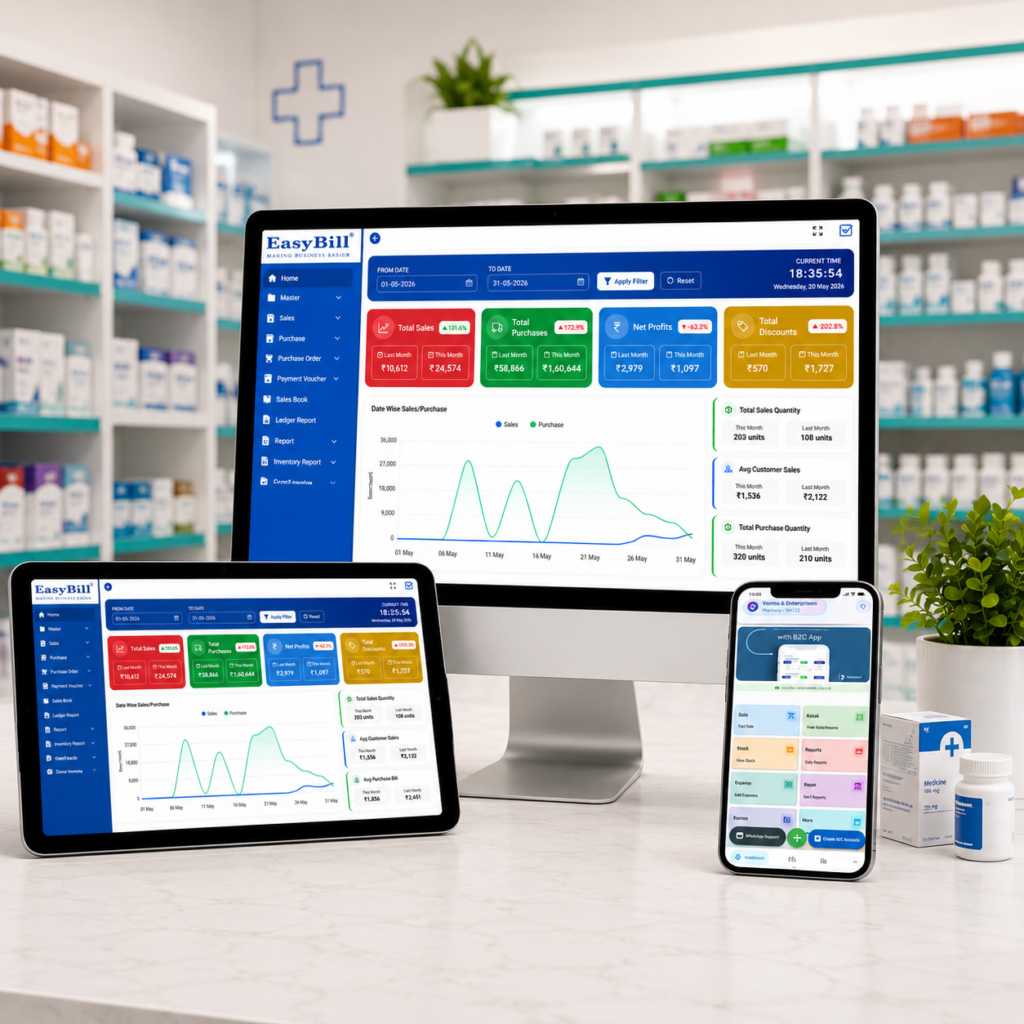
EasyBill ERP already documents real-time stock monitoring, low-stock alerts, barcode integration, batch and lot management, multiple-warehouse support, and tracking of batch numbers, expiry dates and manufacture dates. See EasyBill inventory features.
Who is pharmacy stock management software for?
This guide is for retail pharmacies, medical stores, chemists, hospital pharmacies and pharmacy businesses that already understand basic billing but want tighter control over stock. If your team is still using notebooks, spreadsheets or separate purchase and billing records, the first priority should be one connected stock workflow.
A pharmacy does not deal with stock as one simple number. The same medicine name can appear in different batches with different expiry dates and purchase details. That is why pharmacy-focused inventory software needs to record more than product name and quantity.
What should pharmacy stock management software actually manage?
The useful system starts when stock enters the store and continues until it is sold, returned or adjusted. EasyBill describes a workflow that includes product records, batch numbers, expiry dates, manufacture dates, purchases, sales and inventory tracking. Its medical stock management page also lists batch and expiry management, barcode billing, purchase management, low-stock alerts, supplier management, multi-store inventory and reports.
| Stock activity | What the software should record | Why it matters |
|---|---|---|
| Purchase | Supplier, product, quantity and purchase details | Creates a reliable stock-in record |
| Batch entry | Batch number and related product information | Helps identify the exact stock held |
| Expiry tracking | Expiry date for recorded stock | Helps staff review ageing stock |
| Sale | Sold quantity and invoice | Connects billing with stock movement |
| Low stock | Configured stock threshold or alert | Supports purchase planning |
| Reports | Sales, purchases and inventory information | Gives the owner a clearer operating picture |
Why batch-wise stock control matters
Suppose a pharmacy has the same medicine from two purchases. The product name is identical, but the batches and expiry dates are different. A simple quantity figure does not tell the pharmacist which stock should be reviewed first.
Batch-level records solve that specific problem. They let the team associate quantity and expiry information with the stock received, rather than treating every unit of the medicine as identical.
EasyBill states that its inventory tools support batch numbers, expiry dates, manufacture dates and other product details. Its medical stock management content also describes batch and expiry management as part of the inventory workflow. citeturn1search0turn1search1
How does expiry tracking fit into pharmacy inventory?
Expiry control should not be a once-a-month spreadsheet exercise. It belongs inside the stock workflow.
When expiry information is recorded with stock, the pharmacy team has a searchable record of products that need attention. This makes it easier to review ageing inventory and decide what action is appropriate under the pharmacy’s own supplier-return and dispensing procedures.
EasyBill documents expiry tracking as part of its inventory capabilities and describes expiry-sensitive stock review on its medical-store content. citeturn1search0turn1search4
Do not treat an alert as permission to sell an expired medicine. Software should help staff identify stock that needs review; dispensing and disposal decisions still have to follow applicable pharmacy and medicine-handling requirements.
Can stock management software help prevent stock-outs?
Yes, if the system uses useful stock thresholds and the team actually reviews them.
Low-stock alerts turn a stock check into an action list. Instead of discovering a shortage only after a customer asks for the medicine, the owner has a way to identify products that have reached the configured level and review replenishment.
EasyBill lists low-stock alerts as an inventory feature and describes purchase planning as part of its medical stock workflow. citeturn1search0turn1search1
Where does billing fit into pharmacy stock management?
This is where separate systems become inconvenient.
If billing and inventory are disconnected, the same sale may have to be entered twice: once for the customer invoice and again for the stock record. A connected workflow records the sale while keeping inventory information tied to the transaction.
EasyBill positions its pharmacy and medical-store software around connected billing, inventory, purchases and reporting. Its medical-store billing guide describes medicine stock being updated as purchases and sales are recorded. citeturn1search4turn1search9
If you are comparing an easy billing app, a simple billing app or a billing app for shop, do not judge it only by how quickly it prints an invoice. For a pharmacy, ask what happens to stock after that invoice is created.
Which features should you check before buying?
A long feature list is not enough. Test the workflow with real pharmacy examples.
- Batch and expiry tracking: Check whether batch and expiry details remain connected to stock records.
- Low-stock alerts: Confirm whether the software supports useful stock thresholds and visible alerts.
- Barcode billing: Test the scanner with the products your store actually sells.
- Purchase management: Check how incoming stock is recorded and connected to suppliers.
- Sales and inventory connection: Create a test sale and confirm how the stock record changes.
- Reports: Review whether sales, purchases, inventory and expiry information are easy to find.
- Multi-store support: If you operate more than one location, check whether inventory can be managed across stores or warehouses.
- User permissions and backup: Check who can edit stock and how business data is protected and backed up.
Pharmacy stock software vs manual stock registers
| Area | Manual records | Software-based workflow |
|---|---|---|
| Stock quantity | Checked from registers or spreadsheets | Centralized stock records |
| Batch information | Requires manual lookup | Stored with inventory records |
| Expiry review | Manual checking | Expiry information can be searched and reviewed |
| Billing | Separate from stock in some setups | Billing can be connected with inventory |
| Purchase planning | Based on manual review | Uses current stock visibility and alerts |
| Reports | Manual compilation | Digital sales, purchase and stock reports |
What is the biggest mistake when choosing pharmacy inventory software?
Buying based on the billing screen alone.
A pharmacy may have a fast invoice screen and still have a poor inventory workflow. Before choosing software, test the complete path: purchase a medicine, enter its batch and expiry, sell it, check the stock deduction, find the batch again, review the expiry information and generate the relevant report.
[YOUR EXAMPLE: Add a real customer/demo scenario showing a pharmacy workflow that was difficult to manage manually and how EasyBill handled it.]
Why EasyBill ERP is relevant for pharmacy stock management
EasyBill ERP documents pharmacy-focused billing and inventory capabilities including real-time stock monitoring, low-stock alerts, barcode integration, batch and lot management, multiple-warehouse support and purchase/sales tracking. Its medical stock management content also lists batch and expiry tracking, GST billing, supplier management, multi-store inventory and reporting. citeturn1search0turn1search1
For a pharmacy owner, the useful question is not whether the software has the most features. It is whether those features match the daily stock process.
Read the advantages of a medical store management system if you are comparing the wider operational benefits.
You can also review how to maintain medicine stock using expiry, FEFO and reorder-level practices.
For pharmacy billing requirements, see medical store billing software and its key benefits.
Frequently asked questions
What is pharmacy stock management software?
It is software used to organize pharmacy inventory, including product quantities, purchases, sales, batch information, expiry dates and stock reports.
Can pharmacy stock management software track batch numbers?
Yes, a pharmacy-focused system should support batch-level records. EasyBill documents batch and lot management and batch-number tracking as part of its inventory capabilities. citeturn1search0
Can it track medicine expiry dates?
Yes. EasyBill documents expiry-date tracking within its inventory workflow and medical stock management content. citeturn1search0turn1search1
Does pharmacy inventory software include billing?
Some systems connect inventory with billing. EasyBill positions its pharmacy software around billing, inventory, purchases and reporting in one workflow. citeturn1search7
Is pharmacy stock management software useful for a small medical store?
It is useful when the owner needs better visibility into stock, purchases, batches, expiry information and billing without maintaining separate records. The right feature set depends on the store’s actual workflow.
Make the decision with a real pharmacy test
Do not buy pharmacy stock management software after watching only a sales demo. Enter a few real medicines, add different batches and expiry dates, record a purchase, create a sale and check what the inventory and reports show afterward.
If that workflow feels natural to your staff, the software is worth a closer look. If it requires workarounds for basic stock tasks, keep comparing.
Next step: review EasyBill’s pharmacy inventory and billing workflow, then request a demo using your own medicine list and daily billing process.
External reference: For current GST information and official tax guidance, check the official GST Portal.