
Billing software for retail shop should do more than print an invoice. For a busy retail counter, the useful setup connects billing with GST invoicing, inventory, purchases, payments and business reports so the same sale does not have to be entered in several places.
If you are choosing software for a kirana store, supermarket, general store, apparel shop, electronics store, hardware shop, optical store or another retail business, start with the workflow at your counter—not the length of the feature list.
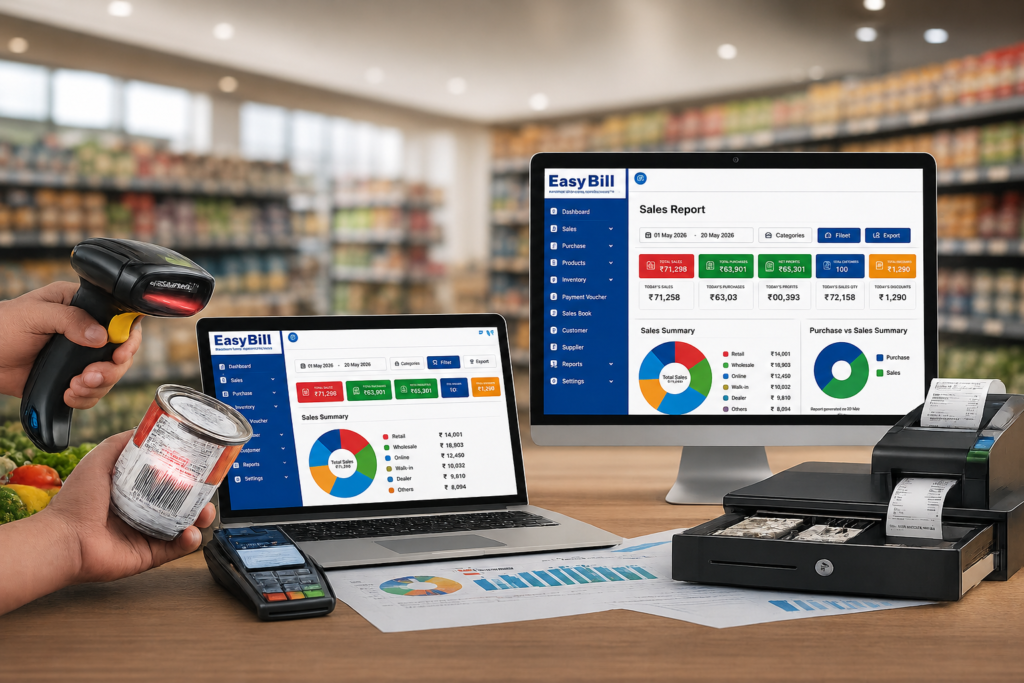
What is the real job retail billing software needs to do?
The searcher is usually trying to answer a practical question: How do I bill customers faster while keeping stock, GST records and daily business information organized?
That sounds simple, but a retail sale touches several records. A product is sold, the invoice is created, stock changes, payment is recorded and the transaction becomes part of sales and reporting data. Good billing software keeps those steps connected.
Current ranking pages commonly compare retail billing products using features such as GST billing, barcode scanning, inventory, offline operation, POS, reports, mobile access and pricing. Some also publish side-by-side comparison tables.
The missing part is the buying workflow. A retailer should not choose software simply because every checkbox says “yes”. The better test is whether the software fits the way the shop actually sells, purchases and manages stock.
What should billing software for a retail shop include?
Fast POS billing
At the counter, the priority is a clean billing process. Staff should be able to find products, enter quantities, apply the relevant tax information and complete the sale without unnecessary steps.
Barcode support is useful for stores with many products or SKUs. EasyBill ERP’s published product information includes barcode-based billing and POS functionality for retail businesses.
GST invoicing
For a GST-registered retail business, invoices need accurate tax information. A suitable system should let you maintain product and tax details and generate professional GST invoices without repeatedly calculating the same information by hand.
EasyBill ERP states that it supports GST and non-GST invoices, automatic tax calculations, HSN/SAC code support and invoice printing or digital sharing.
Inventory connected to sales
This is where retail billing software becomes more useful than a basic invoice generator.
When a sale is recorded, the retailer needs a reliable way to understand what remains in stock. EasyBill ERP publishes features including real-time stock monitoring, low-stock alerts, barcode integration, product categorization, purchase and sales tracking, and multiple warehouse support.
Before buying any system, test this yourself: add one product, record a purchase, sell part of that stock, and check whether the inventory reflects the transaction correctly.
Purchase and supplier management
Retail operations do not stop after the sale. Products arrive from suppliers, purchase invoices need recording, and stock needs to move into the available inventory.
A connected billing and inventory system should let you trace purchases and sales rather than maintaining separate spreadsheets for each process. EasyBill ERP includes purchase entry, sales invoice tracking, supplier records and purchase history in its published feature set.
Customer and payment records
Retailers may need to record customer information, outstanding amounts and payment history, particularly when the business sells on credit.
EasyBill ERP lists customer ledgers, supplier ledgers, outstanding payment tracking, transaction history, account statements and payment reminders among its capabilities.
Business reports
A billing system should leave you with useful information after the counter closes. Sales, purchases, expenses, inventory and GST-related reports help turn transaction data into something the owner can review.
EasyBill ERP publishes sales, purchase, GST, profit and loss, expense, inventory and outstanding reports, along with business performance analytics.
How to choose billing software for your retail shop
1. Start with your busiest billing situation
Do not test software only when the shop is quiet. Think about the moment when several customers are waiting and a staff member needs to bill multiple products quickly.
Check product search, barcode scanning, quantity changes, discounts, tax calculation, payment entry and invoice printing or sharing.
2. Test one complete stock cycle
Create a product. Record a purchase. Sell it. Then check the stock.
This simple test reveals more than a long feature list because it checks whether billing and inventory actually work together.
3. Check your GST workflow
Review how products are configured, how HSN/SAC information is handled, how GST is calculated and what reports are available for your accounting and compliance workflow.
For official GST rules and current requirements, verify details with the official GST portal rather than relying only on software marketing pages.
4. Look at reports before you buy
Ask a simple question: “What will I know about my shop at the end of the day?”
You should be able to identify the reports that matter to your operation, such as sales, purchases, expenses, inventory and outstanding payments.
5. Test data backup and access
Billing data is business data. Before implementation, understand where your information is stored, how backups work, who can access the system and what happens if a computer or device fails.
6. Check whether the software matches your shop size
A single-counter general store does not necessarily need the same workflow as a multi-location retail business. Start with what your team actually needs, then check whether the system can support the next stage of the business.
Billing software vs manual billing: what changes?
Manual billing can work for a very small operation, but the owner or staff has to maintain more information themselves. Sales, stock, purchases, customer balances and reports can become separate records.
With a connected billing system, the goal is to record the transaction once and use that data across the relevant parts of the business.
| Retail task | Manual process | Connected billing software |
|---|---|---|
| Sales invoice | Written or entered manually | Created digitally |
| Stock update | Manual record update | Connected to sales workflow |
| Purchase records | Separate register or spreadsheet | Recorded in the same system |
| Customer balances | Notebook or separate record | Customer ledger and transaction history |
| Business reports | Prepared manually | Generated from recorded transactions |
Why EasyBill ERP fits the retail billing workflow
EasyBill ERP is positioned as billing, inventory and business management software for retail, grocery, pharmacy, optical, wholesale and distribution businesses. Its published retail feature set includes POS billing, GST-compliant invoicing, inventory control, purchases, payments and business reports.
For a retailer evaluating the software, the useful approach is to test your own workflow rather than relying on a generic feature list.
Try these scenarios during a demo:
- Create a new product and assign its relevant billing details.
- Record a purchase and confirm the inventory movement.
- Sell the product through POS billing.
- Check the resulting stock level and transaction record.
- Review sales, inventory and payment-related reports.
[INTERNAL LINK: EasyBill ERP Retail Software]
GST Billing Software for Small Businesses
Retail Billing Software Offline
Common mistakes retailers make when choosing billing software
Choosing on price alone
The lowest subscription or licence price is not necessarily the lowest operating cost. If staff struggle with the counter workflow or stock records need repeated correction, the software can create extra work.
Buying a feature list instead of testing the workflow
Two products can both advertise “inventory management” while handling stock differently. Test the exact purchase-to-sale cycle your shop uses.
Ignoring the cashier experience
The owner may like reports and dashboards, but the cashier uses the billing screen repeatedly. If that screen is slow or confusing, adoption becomes a problem.
Skipping the backup question
Ask where business data is stored and how it can be recovered. Do this before you migrate your existing records.
Trying to solve every future problem on day one
Choose for your current retail workflow and the growth you realistically expect. A small store may need fast billing, GST invoices, stock and reports first; a growing operation may later need additional users, warehouses or branches.
Who should use retail billing software?
Billing software is particularly relevant to retail businesses that handle regular product sales and need billing connected with stock or business records. This includes general retail stores, grocery and supermarket businesses, pharmacies, optical shops, apparel stores, electronics retailers and hardware stores.
EasyBill ERP specifically lists retail, grocery, pharmacy, optical, liquor, hardware, wholesale and distribution use cases.
Frequently Asked Questions
What is billing software for a retail shop?
Billing software for a retail shop is a digital system used to create sales invoices and manage related retail tasks such as inventory, purchases, payments, customer records and business reporting.
Does retail billing software support GST billing?
Many retail billing systems support GST invoicing. Before choosing one, verify the tax configuration, invoice format and reporting workflow for your business. EasyBill ERP publishes GST and non-GST invoicing, tax calculation and HSN/SAC support.
Can billing software manage retail inventory?
Yes, many systems connect sales and purchases with inventory. EasyBill ERP publishes real-time stock monitoring, low-stock alerts, barcode integration and purchase and sales tracking.
Is barcode billing useful for a retail shop?
Barcode billing is useful when a store handles many products or SKUs because products can be identified by scanning instead of repeatedly entering product information manually. EasyBill ERP supports barcode-based billing and POS workflows.
Can retail billing software generate business reports?
Yes. Reporting varies by software. EasyBill ERP publishes sales, purchase, GST, profit and loss, expense, inventory and outstanding reports.
How do I choose the right billing software for my retail shop?
Test the complete workflow: product setup, purchase entry, barcode or product selection, GST invoice creation, payment recording, stock update and reporting. Then check backup, user access and whether the software fits your current shop size.
Final recommendation: test the complete retail workflow
The right billing software for retail shop is the one your staff can use consistently at the counter while keeping billing, inventory and business records connected.
Before you commit, run a real product through the system from purchase to sale and report. That test is more useful than comparing feature counts alone.
If you want to evaluate EasyBill ERP for your retail operation, Book a Demo and test your actual products, GST setup, billing process and inventory workflow.
Sources checked for this article
- EasyBill ERP official website
- EasyBill ERP accounting and inventory features
- EasyBill ERP product information
- Official GST Portal
Claims and details to verify before publication
Confidence note: EasyBill feature claims in this article are based on EasyBill’s currently published website information and should be rechecked if product features change. GST requirements can change, so compliance-specific statements should be verified against the official GST portal or a qualified tax professional. No unsupported pricing, customer counts, performance statistics, testimonials or personal experiences have been added.