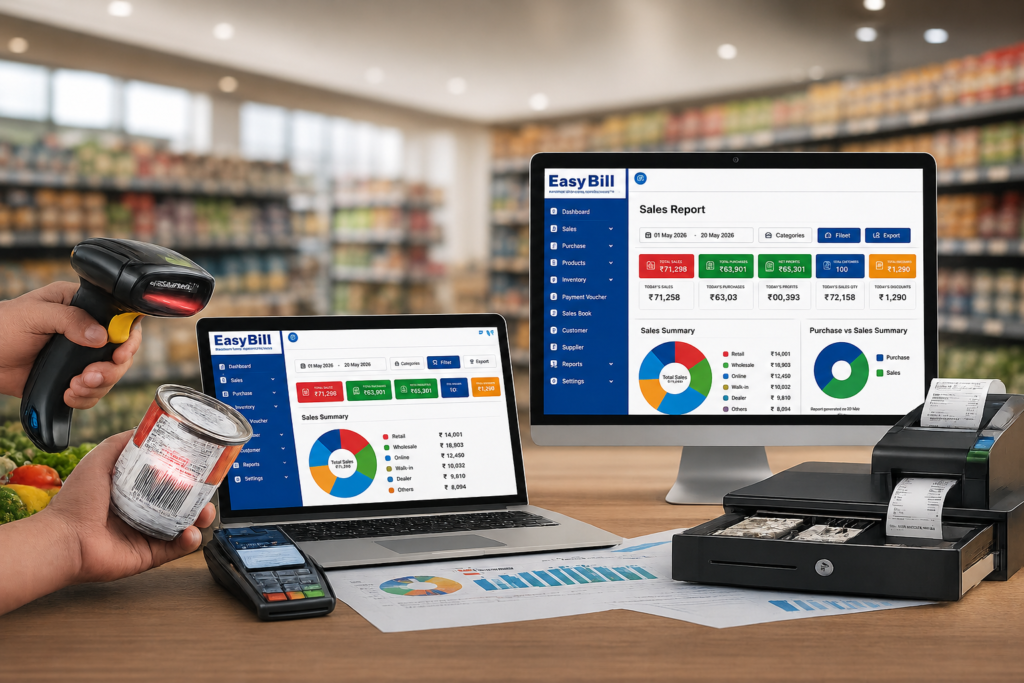
The right billing solution for a retail store should make the counter simpler while keeping sales, stock, purchases, payments, and reports connected. If you are comparing retail billing software, do not start with a long feature list. Start with the actual work your shop needs to complete every day.
For Indian retailers, that usually means quick billing, GST invoices, product and inventory management, POS or barcode support, purchase records, payment tracking, and reports. The real difference between software products is how well those pieces fit together.
What is a billing solution for a retail store?
A billing solution is software used to create sales invoices and maintain the records created by retail transactions. Depending on the product, it can connect billing with inventory, purchases, customer records, payments, POS operations, and business reports.
Current retail billing guides repeatedly cover the same core areas: billing and invoicing, inventory, GST, payments, product management, barcode/POS functions, customer or supplier records, and reporting.
But there is a more useful way to evaluate these systems: follow one real transaction from product selection to the final report. That exposes problems a feature list hides.
What should a retail billing solution actually solve?
Imagine a customer buying five products from your store.
The cashier needs to identify the products, enter quantities, apply the correct pricing or discount, calculate the applicable tax, record payment, and issue the invoice. After the sale, the business still needs an accurate transaction record and, where inventory is integrated, an updated stock position.
A connected system keeps those activities within one workflow instead of making the owner maintain separate records for every stage.
Which features matter most for a retail store?
Fast billing at the counter
Retail billing starts with the cashier. Product search should be straightforward, quantities should be easy to change, and payment recording should not require unnecessary steps.
Speed is not just about how quickly software generates an invoice. It is about how many actions the cashier has to understand before moving to the next customer.
GST billing and invoice management
GST billing is a common requirement for Indian retail businesses, and current retail software pages place GST invoicing among the core capabilities buyers should evaluate.
Do not stop at the words “GST ready.” Create an invoice during the demo using your own products and tax setup. Check the invoice details and the reports your business actually needs.
Inventory connected with sales
Retail billing and stock management are closely linked. A sale tells you what has moved; purchases tell you what has entered the business.
A useful retail billing solution should therefore make it practical to maintain product information, record purchases, track stock, and review inventory-related information. Barcode support becomes particularly useful when the store handles a large product catalogue.
POS and barcode billing
A POS workflow is built around the retail counter. Search, barcode scanning, quantity changes, discounts, payment recording, and invoice generation are common parts of retail POS systems.
If your shop already uses barcodes, test the actual scanner with real products. If your catalogue is small, fast product search might matter more than advanced scanning.
Purchase and supplier management
Billing is only one side of retail operations. Products arrive through purchases, so the software should fit the way you record incoming stock and supplier transactions.
This is where a retail billing system becomes more useful than a simple invoice generator: sales and purchasing information can sit within the same business process when the chosen software supports it.
Payments and customer records
A store may accept cash, UPI, cards, credit, or other payment methods. The exact mix depends on the business.
Customer records also vary by shop. A small counter-sale store may need little customer information, while a business handling credit sales or repeat customers may need more detailed records. Choose based on what your staff actually uses.
Reports that help the owner
Reports should answer practical questions without forcing the owner to reconstruct the information manually.
Review sales, purchases, stock, payments, and customer-related reports during a demo. Then ask a simple question: Can I find the information I need from the system without rebuilding it in a spreadsheet?
How should you choose a billing solution for your retail store?
Use your own store as the test environment.
- Write down your normal billing flow. Start with product selection and finish with payment and invoice generation.
- Use your real product catalogue. Test actual product names, categories, prices, and tax information.
- Create different sales. Test quantities, discounts, returns if relevant, and the payment methods your store uses.
- Check inventory movement. Record a purchase and then sell the same product to see how the stock workflow behaves.
- Test barcode billing. If your store uses barcodes, use the actual scanner and products.
- Review reports. Check the reports you rely on for daily and periodic business reviews.
- Let the cashier test it. The owner is not the only person who needs to find the software easy.
Why a connected retail solution is different from basic billing software
A basic billing application focuses mainly on invoices and sales. A broader retail solution connects the sale with other parts of the store’s operation.
| Retail requirement | Basic billing focus | Connected retail workflow |
|---|---|---|
| Sales invoice | Core billing function | Core billing function |
| GST invoice | Depends on the software | Designed as part of the retail billing workflow when supported |
| Inventory | May be separate | Connected with sales and purchases when supported |
| Barcode/POS | May be limited | Useful for counter-based retail workflows when supported |
| Purchases | May require another record | Can be maintained with the retail workflow |
| Reports | Basic sales information | Broader operational reporting |
The table describes the difference in approach, not a guarantee that every product provides every function. Confirm the exact capabilities before implementation.
What do competitors get right — and where should buyers look closer?
Current ranking and competing pages do a good job covering the obvious requirements: GST, POS, barcode billing, inventory, customer management, reports, payments, and product management.
They also frequently move into pricing tables, ratings, customer counts, free trials, or promotional claims. Those figures change quickly and are not useful as universal benchmarks.
The gap worth focusing on is the actual workflow. A retailer should test whether the software works with their own products, cashier process, stock movement, invoice requirements, and reporting needs. A product can look impressive on paper and still be awkward at the counter.
Where does EasyBill ERP fit?
EasyBill ERP is positioned for product-based businesses and has published content around retail, grocery, pharmacy, optical, wholesale, and distribution use cases. Its product positioning includes billing, inventory, POS, GST billing, purchases, and business reporting.
For a retail store evaluating EasyBill, the practical test is the complete workflow:
Product setup → Purchase → Stock → Sale → Invoice → Payment → Report
If that flow matches the way your store operates, the software becomes much easier to evaluate on its actual usefulness rather than on marketing language.
Who needs a retail billing solution — and who may not?
A connected retail billing system makes more sense for stores handling regular sales, product inventory, GST invoicing, purchase records, or ongoing reporting.
A very small business that creates only occasional invoices and has little need for stock tracking might not need a full retail management system. A larger product catalogue, frequent counter sales, or growing operational records changes the calculation.
Buy for the work you actually need to do.
What mistakes should you avoid?
Choosing by feature count. A long list does not tell you whether the cashier can complete a normal sale comfortably.
Skipping the live demo. Screenshots show appearance. They do not show the number of steps required for a real transaction.
Ignoring inventory. If stock matters to your business, test purchase-to-sale stock movement before choosing software.
Testing only as the owner. Give the billing screen to the person who will use it during busy hours.
Moving live data without asking questions. Before implementation, understand how business data is stored, backed up, exported, protected, and recovered.
Frequently Asked Questions
What is a billing solution for a retail store?
It is software that helps a retail business create invoices and record sales while, depending on the product, connecting those transactions with inventory, purchases, payments, customers, POS operations, and reports.
Does a retail billing solution support GST billing?
GST billing is a common feature among retail software products serving Indian businesses. Verify the exact invoice fields, tax configuration, and reporting requirements of your store before choosing a solution.
Can a retail billing solution manage inventory?
Many retail systems connect sales and purchases with inventory records. The exact stock features differ by product, so test them using your actual product catalogue.
Is barcode billing useful for retail stores?
Yes, particularly when a store handles products with barcodes. Scanning can reduce manual product entry during checkout, provided the software and hardware support the workflow.
Can small retail stores use billing software?
Yes. Small stores can use billing software when they need digital invoices, GST billing, stock records, or organized sales reports. The system should match the shop’s needs rather than add unnecessary complexity.
What should I check before buying a retail billing solution?
Test billing, GST invoices, product search, inventory updates, barcode scanning if required, purchase records, payment handling, reports, data backup, and cashier usability. A real demo using your own workflow is more useful than a generic feature list.
Final recommendation
Choose the billing solution that fits your store’s actual workflow. Put real products through a demo, create the invoices your business uses, test stock movement, and let your cashier operate the system.
For EasyBill ERP, the next practical step is to evaluate the complete journey from product setup to billing, payment, inventory, and reporting. That gives you a concrete basis for deciding whether the solution fits your retail store.
Sources and confidence: Competitor/category claims in this article were checked against current retail billing pages from Techjockey, MyBizSoft, Sellbii, SoftwareSuggest, and other current retail software sources.
EasyBill-specific positioning should be confirmed against the current EasyBill product/demo configuration. Pricing, customer counts, ratings, speed claims, and promotional figures were intentionally not presented as universal facts.