
Hospital Pharmacy Dispensing and Billing Software
Hospital pharmacy dispensing and billing software can make a busy hospital pharmacy easier to run when dispensing, billing, inventory, purchasing, and reporting work together. In a real hospital, pharmacy staff may handle inpatient requests, outpatient prescriptions, emergency requirements, stock transfers, returns, and billing in the same shift. The goal is not to add another complicated screen to the workflow. It is to make everyday work clearer, faster, and easier to review.
Good hospital pharmacy dispensing and billing software should fit the way your pharmacy actually operates. It should help staff find medicines quickly, maintain accurate stock records, handle batches and expiry dates, create bills, and give managers useful information without forcing them to maintain several disconnected records.
In practical terms: The best hospital pharmacy dispensing and billing software connects medicine transactions with inventory and billing while supporting controlled access, reporting, and practical day-to-day workflows. The right setup depends on the hospital’s pharmacy policies, roles, integrations, and compliance requirements.
Table of Contents
- Why hospitals need connected pharmacy software
- How dispensing and billing work together
- 7 important features to look for
- Batch, expiry, and inventory control
- Reports that help pharmacy managers
- Access control and responsible data handling
- How EasyBill ERP can support pharmacy operations
- How to choose the right solution
- Frequently asked questions
Why Hospitals Need Connected Pharmacy Software
A hospital pharmacy is different from a simple retail counter. The team may receive medicines from suppliers, store multiple batches, issue medicines against approved requests, manage returns, prepare invoices, and reconcile stock. When each task is handled in a separate system, staff often repeat the same entry and spend more time checking whether records agree.
Hospital pharmacy dispensing and billing software can bring these activities into one connected workflow. A transaction can be recorded once and then used for the related stock and billing records. This reduces unnecessary duplication and gives authorized users a clearer history of what happened.
How Dispensing and Billing Work Together
Dispensing and billing are related, but they serve different purposes. Dispensing is about supplying medicines through the hospital’s approved process. Billing records the commercial side of the transaction. Hospital pharmacy dispensing and billing software can connect the two without replacing professional verification or hospital policy.
For example, an authorized staff member can search for a medicine, check the available stock or batch, enter the quantity, apply the configured billing rules, and generate the invoice. Once the transaction is completed, inventory can reflect the movement and the transaction remains available for reporting.
The exact workflow should be configured around the hospital’s operating procedures. Prescription review, dispensing checks, approvals, and other professional responsibilities should remain with qualified and authorized personnel.
7 Important Features to Look for
1. Fast medicine search and billing
A pharmacy counter can become busy within minutes. Hospital pharmacy dispensing and billing software should make it simple to locate an item by medicine name, product code, barcode, or another identifier supported by the pharmacy. A clean billing screen can reduce clicks and make repetitive transactions less tiring for staff.
2. Batch and expiry tracking
A quantity-only inventory record is rarely enough for medicines. Batch numbers and expiry dates provide more useful context. With hospital pharmacy dispensing and billing software, the pharmacy can keep batch information connected to inventory transactions and use that information when reviewing stock that needs attention.
3. Clear stock visibility
Staff need a practical answer to a simple question: what is available right now? When purchases, dispensing, sales, returns, and approved adjustments update the same inventory record, hospital pharmacy dispensing and billing software can provide a more consistent view of stock.
4. Purchase and supplier records
Pharmacy operations begin before a medicine reaches the dispensing counter. Purchase records help teams understand what was received, from whom, and when. Connecting purchasing with inventory makes reconciliation easier and gives managers a better picture of procurement activity.
5. Returns and controlled adjustments
Returns, cancellations, damaged products, and stock corrections need clear records. A useful system should provide controlled ways to record these events so the inventory history does not become confusing. Hospital pharmacy dispensing and billing software is most helpful when these exceptions are handled as part of the normal workflow rather than through manual side records.
6. Role-based access
Different pharmacy employees may have different responsibilities. Role-based permissions can limit sensitive actions, such as changing settings, editing inventory, approving adjustments, or viewing financial reports. This is an important operational safeguard for hospital pharmacy dispensing and billing software deployments.
7. Useful management reports
Managers usually need more than a total sales number. Reports can cover purchases, stock levels, fast-moving items, expiry-related inventory, transaction history, and other configured measures. The purpose of hospital pharmacy dispensing and billing software reporting is to turn routine transactions into information that helps the team make better operational decisions.

Batch, Expiry, and Inventory Control
Inventory management is one of the areas where pharmacy-specific software can make a noticeable difference. A hospital may hold several batches of the same medicine, each with a different expiry date. The system should make it easy for authorized users to see those details and investigate stock movements when required.
Hospital pharmacy dispensing and billing software can support better stock rotation by keeping batch and expiry information close to the transaction history. It can also help staff identify low-stock or expiry-related items, depending on the features and configuration available in the chosen product.
For broader medication-safety context, pharmacy teams can review the World Health Organization’s Medication Without Harm initiative. Software is an operational aid, not a substitute for clinical checks, pharmacy standards, or safe dispensing procedures.
Reports That Help Pharmacy Managers
Good reporting should answer practical questions without requiring hours of spreadsheet work. Which medicines are moving quickly? What stock is available? What was purchased during a particular period? Which transactions need review? These are the kinds of questions that make hospital pharmacy dispensing and billing software valuable beyond the billing counter.
A manager can also use reports to compare activity over time and identify unusual changes. For example, a sudden increase in demand for a particular product may affect replenishment planning. Reports should support decisions while leaving the final operational judgment with the hospital team.
Access Control and Responsible Data Handling
Hospitals should treat pharmacy and transaction data carefully. Hospital pharmacy dispensing and billing software should be deployed with appropriate user permissions, secure accounts, reliable backups, and clear procedures for who can view or change information.
Where patient-related information is processed, the hospital should also follow the privacy, security, retention, and healthcare requirements that apply to its location. Before deployment, involve the responsible pharmacy, IT, management, and compliance teams so the software configuration matches the organization’s policies.
How EasyBill ERP Can Support Pharmacy Operations
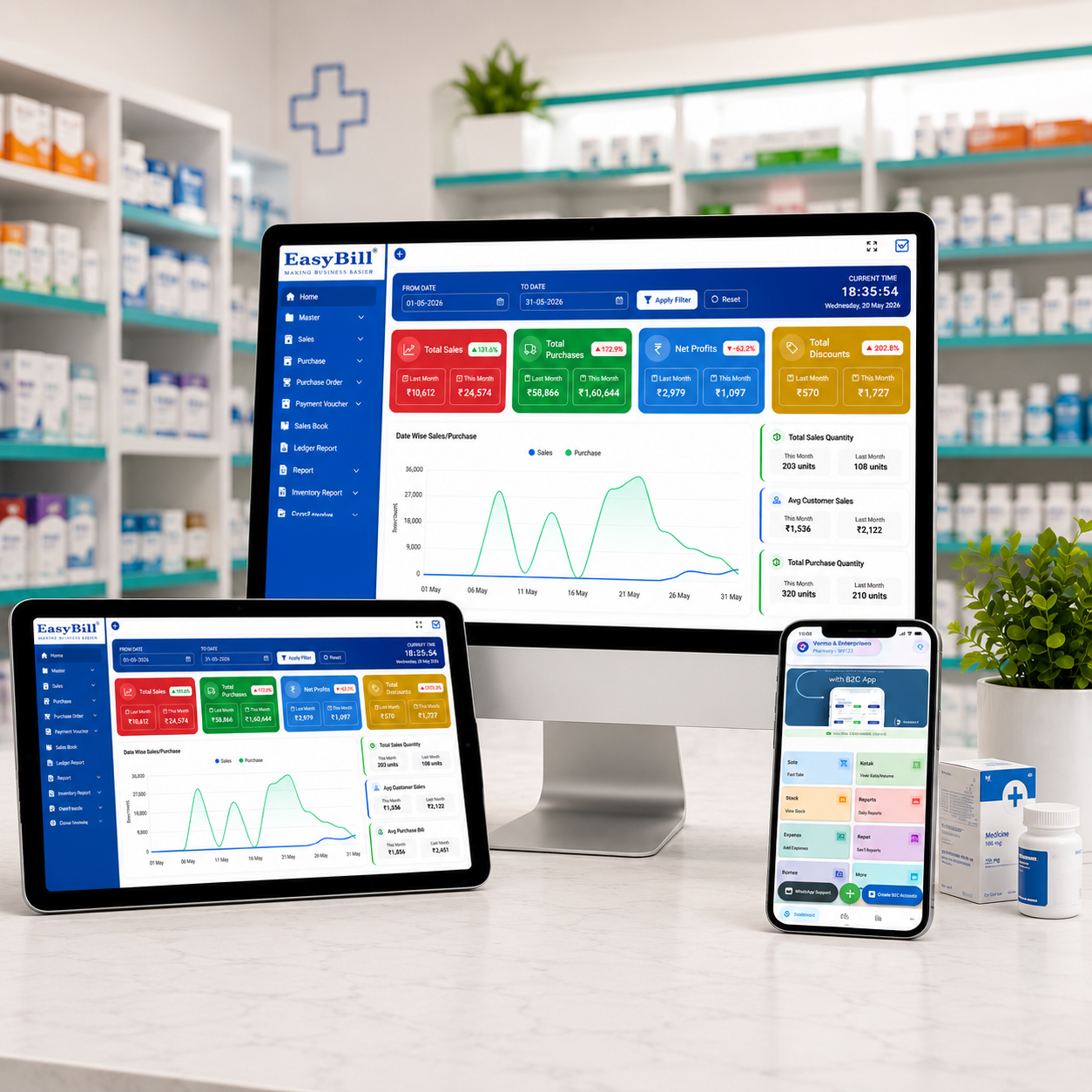
EasyBill ERP pharmacy billing software is designed to bring everyday pharmacy billing and inventory activities into a practical workflow. Depending on the selected configuration, it can support billing, inventory management, purchases, reporting, and GST-oriented invoicing for pharmacy businesses.
For organizations comparing broader pharmacy workflows, the EasyBill pharmacy software page provides additional information about the platform. Hospitals should evaluate any product against their own dispensing process, user roles, approval rules, integrations, reporting needs, and compliance requirements before implementation.

How to Choose the Right Solution
Start with your actual workflow instead of starting with a feature list. Map how medicines are received, stored, requested, dispensed, billed, returned, and reported. Then test whether the hospital pharmacy dispensing and billing software can support those steps without unnecessary workarounds.
Use realistic examples during a demo. Ask the vendor to show multiple batches, near-expiry stock, returns, discounts, taxes, cancelled bills, stock adjustments, user permissions, and reports. A hands-on test often reveals usability issues that are easy to miss in a sales presentation.
Also look at implementation and support. Pharmacy software is used throughout the working day, so staff need understandable screens and dependable help when something goes wrong. Training, backups, data security, integrations, and ongoing support should be considered alongside the feature list.
What Makes a Pharmacy System Practical?
The best system is not necessarily the one with the longest feature list. Hospital pharmacy dispensing and billing software becomes practical when common tasks take fewer steps, records remain consistent, and managers can find the information they need without creating extra administrative work.
Usability matters too. If staff need several screens to complete a routine transaction, adoption can suffer even when the underlying technology is strong. Before choosing a platform, let the people who will actually use it test common workflows and give feedback.
Frequently Asked Questions
What is hospital pharmacy dispensing and billing software?
Hospital pharmacy dispensing and billing software is a pharmacy-focused system that can connect dispensing-related workflows with billing, inventory, purchasing, and reporting. Features vary by product and configuration.
Can this software track medicine batches and expiry dates?
Many pharmacy-focused systems support batch and expiry records. Before buying, confirm that the specific batch tracking, expiry alerts, stock rotation, and reporting features match your hospital’s requirements.
Does software replace pharmacist verification?
No. Hospital pharmacy dispensing and billing software supports operational work, but prescription review, dispensing checks, authorization, and clinical responsibilities should remain with appropriately qualified staff.
Can it connect billing with inventory?
Yes, many systems are designed to connect transactions with stock movement. Confirm the exact workflow during a demonstration, especially for returns, cancellations, adjustments, and multiple batches.
Is cloud-based software suitable for a hospital pharmacy?
It can be, depending on the hospital’s infrastructure, connectivity, security requirements, user model, and operational policies. Evaluate access controls, backups, availability, integrations, and support before selecting a cloud deployment.
Final Thoughts
Hospital pharmacy dispensing and billing software is most valuable when it fits the pharmacy’s real working environment. The right solution can reduce repetitive entry, connect billing and inventory records, improve stock visibility, and make reporting easier for authorized staff.
Before making a decision, focus on the complete workflow rather than one attractive feature. Test real examples, involve pharmacy users, review security and support, and make sure the software complements—not replaces—the professional processes that keep hospital pharmacy operations safe and accountable.