
Cheap Pharmacy Billing: 7 Smart Ways to Save Without Cutting Essentials
Last updated: August 25, 2026
Quick answer: Cheap pharmacy billing can work well for a small store when the software still provides essential billing, inventory, purchase, batch and expiry-management functions.
In simple terms: Cheap pharmacy billing refers to lower-cost billing software designed to cover the core transaction and stock-management needs of a pharmacy.
For a small pharmacy, software cost matters. Every monthly expense has to make sense, especially when the store is still growing. But choosing cheap pharmacy billing should not mean settling for software that makes billing, stock management or daily work harder.
The better approach is to look at the complete value. A pharmacy needs billing that is easy to use, inventory records that stay organized and features that support the work staff actually do. If the software handles those basics at a sensible price, it can be a practical choice for a growing medical store.
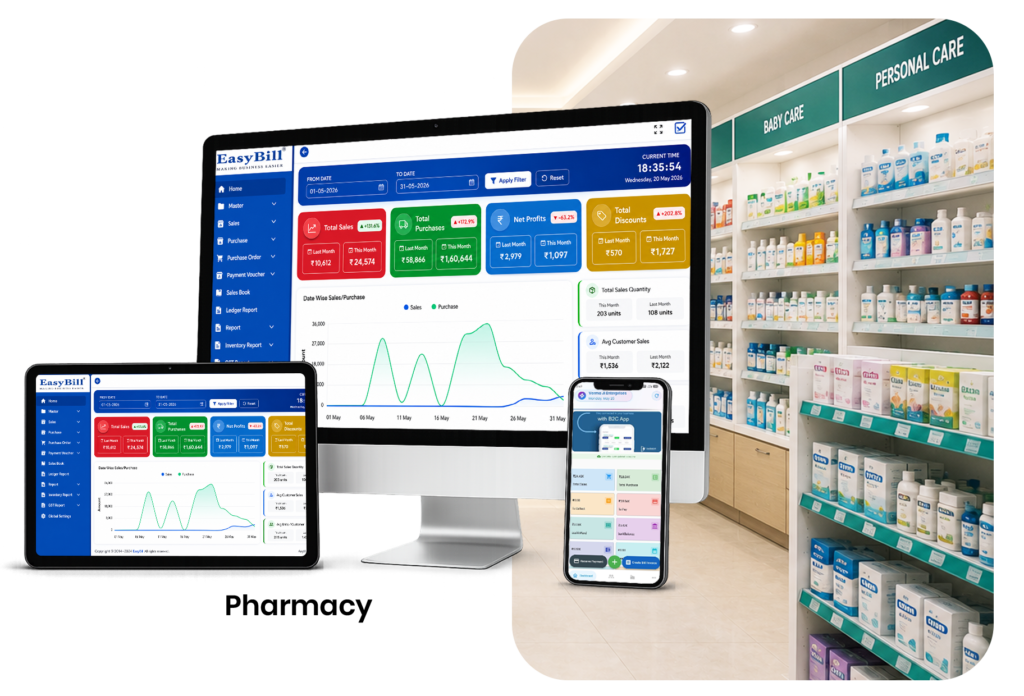
Table of Contents
- What Does Cheap Pharmacy Billing Really Mean?
- 7 Smart Benefits
- Features Worth Paying For
- How to Compare Pharmacy Software Cost
- EasyBill ERP Pricing and Pharmacy Billing
- Budget Software vs Manual Billing
- Frequently Asked Questions
What Does Cheap Pharmacy Billing Really Mean?
Cheap pharmacy billing does not necessarily mean choosing the lowest-priced software you can find. A low price is useful only when the software still covers the everyday needs of your pharmacy.
For example, if a cheap system saves a little money but forces staff to maintain separate stock registers, purchase records or expiry notes, the store may spend more time and effort elsewhere. A sensible pharmacy billing solution should balance affordability with usability and the features your business genuinely needs.
7 Smart Benefits of Choosing Affordable Pharmacy Billing Software
1. Lower Software Cost
A budget-friendly billing system can make digital pharmacy management more accessible to small medical stores. This is especially helpful for businesses that are moving away from manual billing for the first time.
2. Faster Counter Billing
Affordable software should still make common billing tasks simple. Quick medicine search, saved product information and barcode support can reduce repetitive work at the counter.
3. Better Stock Visibility
Billing and inventory often go hand in hand. When sales are connected with stock records, the owner can get a clearer idea of what is available instead of relying entirely on manual updates.
4. Less Paperwork
Digital records can reduce dependence on notebooks and scattered spreadsheets. That can make it easier to find previous transactions, purchase details and business information when required.
5. Room to Grow
A pharmacy may start with a few daily transactions and become much busier over time. Choosing affordable software that can support increasing billing and inventory needs can prevent the business from having to change systems too quickly.
6. Better Inventory Decisions
When billing, purchases and stock information are connected, owners can make purchasing decisions using recorded information rather than memory alone. Features such as batch, expiry and low-stock tracking can add further value when available.
7. Predictable Business Spending
Knowing the software cost in advance makes it easier to plan business expenses. Before choosing a plan, check what is included, what your store actually needs and whether additional costs apply to the features you expect to use.
Features Worth Paying For in Cheap Pharmacy Billing Software
A low-cost system should still handle the basics well. When comparing options, look for features such as:
- Fast medicine billing and search
- Barcode support
- Medicine inventory management
- Purchase and supplier records
- Batch and expiry tracking
- Low-stock or reorder monitoring
- GST invoice support
- Sales and inventory reports
- User access controls where needed
- Data backup and recovery options
You do not necessarily need every advanced feature from day one. The right choice is the one that covers your current workflow without making the software unnecessarily complicated.
How to Compare Pharmacy Software Cost
Price is only one part of the decision. Before buying, consider what the software actually gives your pharmacy in return.
| What to Compare | Why It Matters |
|---|---|
| Software price | Helps you plan your regular business expense |
| Billing features | Should cover the store’s daily counter workflow |
| Inventory | Helps keep medicine stock connected with sales |
| Batch and expiry | Useful for pharmacy-specific inventory control |
| Reports | Helps owners review recorded business activity |
| Support | Useful when staff need help using the system |
EasyBill ERP Pricing and Pharmacy Billing
If you are specifically looking for an affordable pharmacy billing option, check the current EasyBill ERP pricing page for the available plans and pricing details. Reviewing the pricing page directly is the best way to compare the current offering instead of relying on an old price mentioned in a blog post.
You can also explore EasyBill Pharmacy Billing Software to see the pharmacy-focused billing and inventory workflow.
For broader stock requirements, read our Chemist Inventory Software guide. If low-stock monitoring is a priority, the Stock Alert Software for Medical Shop guide can help you understand that workflow.
Cheap Does Not Have to Mean Basic
A small pharmacy does not need to buy the most expensive system available. What matters is getting the features that solve real problems without paying for things the team will never use.
For one store, simple billing and stock control may be enough. A larger pharmacy may need batch management, expiry tracking, purchase controls, reports or more advanced inventory features. The right budget depends on the way the business actually operates.
Budget Pharmacy Software vs Manual Billing
| Area | Manual Billing | Affordable Pharmacy Software |
|---|---|---|
| Billing | More handwritten or repeated entry | Digital billing workflow |
| Stock records | Separate registers | Can connect sales with inventory |
| Purchase history | Manual record keeping | Digital purchase records |
| Reports | May require manual calculations | Based on recorded transactions |
| Data search | Can take longer | Digital product and transaction search |
Who Should Consider Affordable Pharmacy Billing?
Affordable pharmacy billing software can be a practical option for independent chemists, neighborhood medical stores, small retail pharmacies and businesses that are moving from manual billing to digital management.
It can also make sense for a growing pharmacy that wants to control software costs while still keeping billing and inventory organized.
Frequently Asked Questions
What is cheap pharmacy billing software?
It refers to affordable pharmacy billing software that helps medical stores manage everyday billing without requiring a large software budget. The important point is to compare price with the features and support included.
Is cheap pharmacy billing software good for a small medical store?
Yes. A small store can benefit from affordable billing software if it provides the basic features needed for billing, inventory and daily record keeping.
How much does pharmacy billing software cost?
Pricing varies by provider, plan and included features. Check the provider’s current pricing page for the latest cost instead of relying on outdated figures.
Can affordable pharmacy software manage inventory?
Many pharmacy billing systems include inventory features. Before choosing one, confirm that it supports the stock, purchase, batch and expiry workflows your store needs.
Can pharmacy billing software support GST invoices?
Many systems provide GST-related billing features. Businesses should configure tax information according to their applicable requirements and refer to the official GST Portal for current GST information.
What should I check before buying cheap pharmacy billing software?
Check the billing workflow, inventory features, batch and expiry support, reports, backups, user access, customer support and the complete pricing structure. A low starting price is not useful if important features cost extra.
Final Thoughts
Choosing cheap pharmacy billing is really about finding the right balance between cost and usefulness. A pharmacy should not have to overspend to move away from manual billing, but saving money should not mean creating more work for staff.
Compare the current plans, check the features you will actually use and think about how the software will fit into your daily pharmacy routine. If the price is reasonable and the workflow feels practical, affordable pharmacy software can be a sensible step toward better billing and inventory management.