
Best POS System for Grocery Store with Barcode & GST Billing
At a glance: The best POS system for a grocery store should connect barcode billing, GST invoicing, inventory, payments and sales reports in one workflow. EasyBill ERP is designed for grocery stores, kirana shops, supermarkets and other retail businesses that need faster checkout and better stock control.
What to look for: Before choosing a grocery POS system, test barcode scanning, GST invoice creation, stock updates, payment modes, purchase entry, reports and user permissions with sample store transactions.
Last updated: September 7, 2026
Running a grocery store is not easy. It requires speed, accuracy and good inventory management. The Best POS System for Grocery Store helps grocery store owners billing manage stock generate GST invoices and improve customer service. Whether you own a grocery store, a supermarket or a big retail business the right POS software can make daily operations easier and increase profitability.
Best POS System for Grocery Store EasyBill POS solution designed for Indian retailers. It combines barcode billing, GST billing, inventory management, accounting, customer management and business reports into one platform.
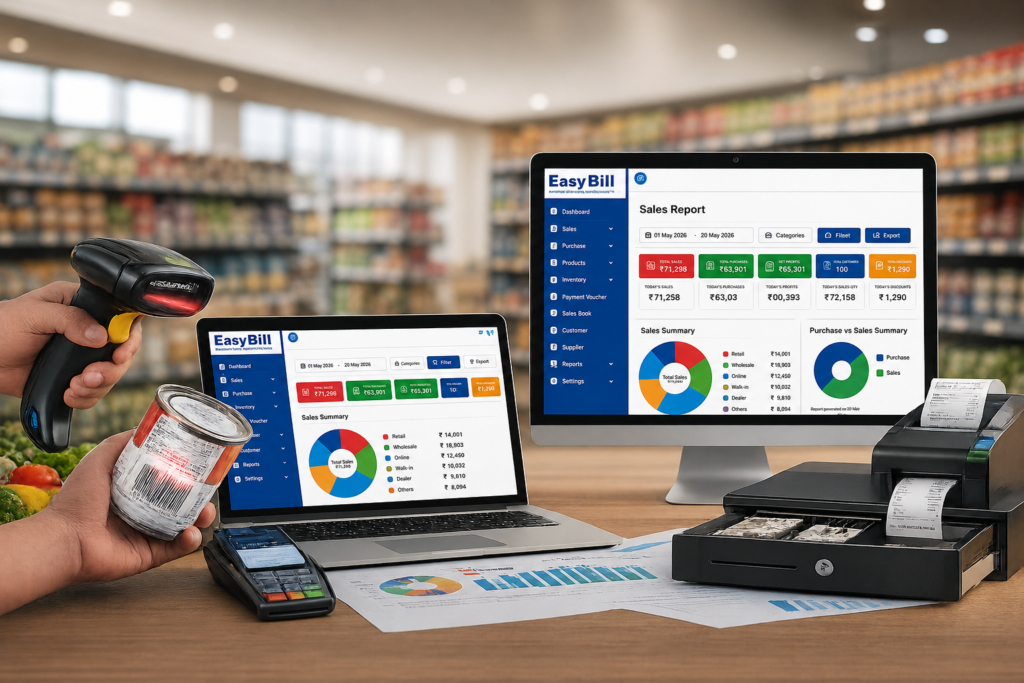
Table of Contents
What is the Best POS System for Grocery Store?
Why Every Grocery Store Needs a POS System
Features of the Best POS System for Grocery Store
Barcode Billing for Faster Checkout
GST Billing Made Easy
Smart Inventory Management
Customer and Loyalty Management
Business Reports and Analytics
Benefits of EasyBill ERP
Frequently Asked Questions
What is the Best POS System for Grocery Store?
The Best POS System for Grocery Store is software that helps grocery store owners manage billing, inventory, accounting, barcode scanning, customer records, suppliers and GST compliance from a dashboard. It replaces billing and provides real-time business insights for better decision-making.
Why Does Every Grocery Store Need a POS System?
Direct answer: A grocery POS system helps stores process sales faster while keeping product prices, inventory, GST billing, payments and reports connected.
A modern grocery store sells hundreds or even thousands of products every day. Manual billing and stock management often lead to mistakes, checkout and inventory losses.
A reliable grocery POS system helps you:
1. Process bills quickly
2. Manage inventory automatically
3. Generate GST invoices
4. Track sales in time
5. Reduce billing errors
6. Improve customer satisfaction
7. Increase employee productivity
What Features Should a Grocery POS System Have?
Direct answer: A useful grocery POS should support barcode billing, GST invoices, inventory tracking, purchase management, customer records, supplier management, payments and business reports.
Barcode Billing
Barcode scanning speeds up the checkout process. Eliminates manual billing errors. Simply scan the product barcode and the software automatically adds the item to the bill.
The benefits of barcode billing include:
* Billing
* Accurate pricing
* Reduced waiting time
* Improved customer experience
GST Billing
EasyBill ERP generates GST- invoices with automatic tax calculations.
The features of GST billing include:
* GST Invoice
* CGST, SGST and IGST
* HSN Code Support
* GST Reports
* Tax Summary
Inventory Management
Inventory is automatically updated after every sale and purchase.
The features of inventory management include:
* Stock Tracking
* Low Stock Alerts
* Purchase Management
* Batch Tracking
* Expiry Management
* -Warehouse Support
Accounting Management
You can manage your business finances with integrated accounting features.
The features of accounting management include:
* Sales Ledger
* Purchase Ledger
* Cash Book
* Reports
* Profit and Loss
* Balance Reports
Customer Management
You can maintain customer information for better service.
The features of customer management include:
* Customer Database
* Credit Accounts
* Loyalty Programs
* Purchase History
* WhatsApp Invoice Sharing
Supplier Management
You can track supplier details efficiently.
The features of supplier management include:
* Purchase Orders
* Supplier Ledger
* Payment Tracking
* Vendor Reports
Business Reports and Analytics
You can make decisions using detailed reports.
You can generate:
* Daily Sales Report
* Monthly Sales Report
* Product- Sales
* Category-wise Sales
* GST Reports
* Profit Analysis
* Inventory Reports
Why Choose EasyBill ERP as a Grocery POS System?
Direct answer: EasyBill ERP combines grocery POS billing, barcode scanning, GST invoicing, inventory, customer and supplier management, payments and business reporting in one connected workflow.
EasyBill ERP offers everything a grocery retailer needs in one software.
How Should You Test a Grocery POS System Before Buying?
Direct answer: Test the POS with sample grocery products, barcode scans, GST invoices, payments, purchases, stock changes and sales reports before choosing it for regular store operations.
Grocery POS Evaluation Checklist
- Add sample grocery products, prices, GST rates and opening stock.
- Scan barcodes and create sample customer invoices.
- Record a purchase and verify that inventory changes correctly.
- Test cash, UPI and card payment workflows.
- Review daily sales, inventory and GST-related reports.
- Check user permissions, backup and data-security requirements.
Practical Grocery POS Testing Example
For a repeatable demo, use 20 sample grocery products, opening stock, one barcode sale, one GST invoice, one purchase entry and a daily sales report. Compare the expected stock balance with the software result before approving the workflow.
Grocery POS System Comparison Checklist
| Area | What to Check |
|---|---|
| Billing | Fast product lookup and invoice creation |
| Barcode | Accurate scanning and product matching |
| GST | Configured tax rates and invoice details |
| Inventory | Sales and purchases update stock correctly |
| Payments | Cash, UPI and card workflows |
| Reports | Sales, stock and GST-related reporting |
The key features of EasyBill ERP include:
* Fast POS Billing
* Barcode Scanner Support
* GST Billing(GST Portal: https://www.gst.gov.in
* Inventory Management
* Accounting Software
* CRM
* Supplier Management
* Customer Management
* Multi Payment Support
* QR Code Billing
* WhatsApp Invoice
* Email Invoice
* Cloud Backup
* Multi User Access
* Business Dashboard
Benefits of Using EasyBill ERP for Grocery Stores
Using the Best POS System for Grocery Store helps businesses:
* Improve billing speed
* Reduce work
* Increase billing accuracy
* Manage stock efficiently
* Track profits
* Reduce inventory losses
* Improve customer experience
* Generate GST reports instantly
* Increase operational efficiency
* Grow sales
Who Should Use a Grocery POS System?
Direct answer: This type of POS software is useful for grocery stores, kirana shops, supermarkets, departmental stores, mini marts, convenience stores and retail outlets that need connected billing and inventory management.
EasyBill ERP is suitable for:
* Grocery Stores
* Kirana Stores
* Supermarkets
* Departmental Stores
* Mini Marts
* Retail Shops
* Wholesale Stores
* Convenience Stores
Frequently Asked Questions About Grocery POS Systems
Which is the best POS system for a grocery store?
EasyBill ERP is one of the best POS systems for grocery stores offering barcode billing, GST billing, inventory management, accounting, CRM and business reporting.
Does EasyBill ERP support barcode billing?
Yes it supports barcode scanners for accurate grocery billing.
Can I generate GST invoices?
Yes EasyBill ERP automatically generates GST- invoices.
Does it manage inventory?
Yes inventory updates automatically after every sale and purchase.
Can I manage stores?
Yes EasyBill ERP supports -store and multi-location grocery businesses.
Choosing the Best POS System for Grocery Store can significantly improve billing speed, inventory accuracy and overall business efficiency. EasyBill ERP combines barcode billing, GST billing, accounting, CRM, inventory management and business analytics into one retail solution. Whether you run a grocery shop or a large supermarket EasyBill ERP helps you streamline operations and grow your business with confidence. The Best POS System for Grocery Store like EasyBill ERP is very useful for grocery store owners. EasyBill ERP is the Best POS System, for Grocery Store.