
Billing Software in Hisar for GST, POS & Inventory
Last updated: September 5, 2026
Short answer: Billing Software in Hisar is a business management system that connects GST billing, POS sales, inventory, purchases, barcode billing and reports in one place. EasyBill ERP is designed to help Hisar retailers, wholesalers, pharmacies, grocery stores and other product-based businesses manage these daily operations more efficiently.
Key takeaway: If you need more than invoice printing, choose billing software that connects sales with stock, purchases, customers and reports. This connected approach makes everyday billing easier to manage and gives business owners a clearer view of operations.
If you are looking for Billing Software in Hisar, the key is not simply creating invoices. A useful system should connect billing with inventory, purchase management, customer records and reporting. EasyBill ERP is designed for that connected workflow, with tools for GST billing, POS operations, barcode scanning, stock control and business reporting.
- Best for: Retail, grocery, pharmacy, wholesale, distribution and other small-to-growing businesses.
- Core workflow: Sales → GST invoice → automatic stock update → reports.
- Key benefit: Billing, inventory and business information stay connected instead of being maintained in separate registers.
Book a Free Demo
See how EasyBill ERP can fit your shop’s billing, stock and reporting workflow before you decide.
Why Businesses in Hisar Need Better Billing
Businesses in Hisar often handle a mix of walk-in sales, repeat customers, supplier purchases and changing stock levels. When these records are maintained manually, it becomes harder to identify stock shortages, check previous sales or prepare accurate invoices quickly. A connected billing system can make the routine process more consistent.
EasyBill ERP combines counter billing with inventory and reporting tools. That means a sale can do more than produce an invoice: it can also update stock and contribute to the reports used to understand business performance.
What Billing Software in Hisar Should Include
Bottom line: Choose a billing system that covers the complete sales cycle, not just invoice printing. For most retail and wholesale businesses, the essential areas are GST billing, inventory, barcode support, purchases, customer records and reporting.
- GST-ready invoice generation
- Fast POS and counter billing
- Real-time inventory tracking
- Barcode-based product billing
- Purchase and supplier management
- Sales and business reports
- Customer and payment records
- Multi-user access and data security
EasyBill ERP Features for Hisar Businesses
GST Billing and Invoicing
Create professional GST invoices while keeping tax calculations within the billing workflow. This helps reduce repetitive manual calculations and makes everyday invoicing easier for staff.
For official GST information and current government guidance, businesses can also refer to the GST portal.
POS and Fast Counter Billing
A POS workflow helps staff add products, calculate the bill and complete sales without relying on separate manual registers. This is particularly useful when several customers are waiting during busy periods.
Inventory Management
Track stock movement as sales and purchases are recorded. Real-time stock visibility can help businesses identify fast-moving products, review low-stock items and reduce avoidable stock mismatches.
Barcode Billing
Barcode scanning can speed up product selection at the counter and reduce typing-related errors. Grocery stores, supermarkets, pharmacies and other product-based retailers can benefit from a barcode-driven workflow.
Purchase and Supplier Management
Record purchases, maintain supplier information and keep purchase history available for reference. Connecting purchases with inventory makes it easier to understand where stock came from and how it changes over time.
Sales and Business Reports
Review daily, weekly, monthly and yearly sales information to understand business performance. Reports can help owners identify popular products, monitor sales trends and make better purchasing decisions.
Customer Management
Keep customer details, transaction history and payment information organized in one place. This can be useful for businesses that serve repeat customers or need to review previous transactions.
Multi-User Access and Security
Different staff members can work within the system according to the access and permissions configured for the business. Backup and security features help protect important operational data.
Example Billing Workflow for a Hisar Retail Shop
Example: Imagine a retail shop receives a customer order for several products. The staff scans or selects each product, generates the GST invoice, completes the sale and records the transaction. The connected workflow can then reflect the sale in inventory and make the transaction available in reports.
- Select or scan the products.
- Confirm quantities and prices.
- Generate the GST invoice.
- Complete the customer payment.
- Update the stock record through the sales transaction.
- Review the sale later through business reports.
This example shows why connected billing is more useful than an invoice-only tool: the same transaction can support billing, stock control and reporting.
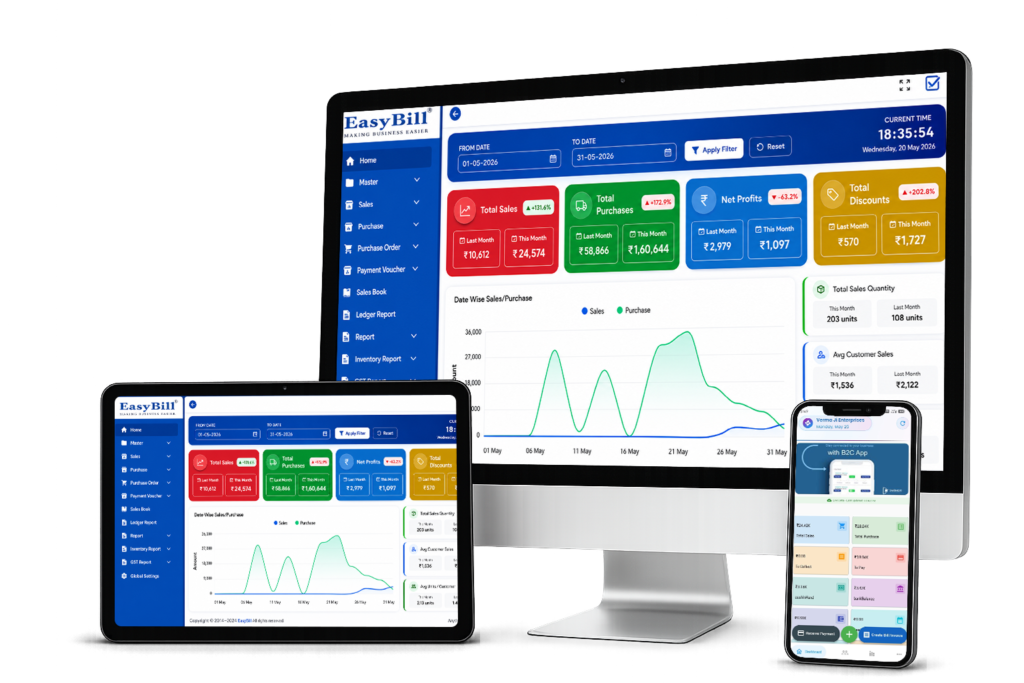
Example EasyBill ERP billing interface
Industries That Can Use Billing Software in Hisar
EasyBill ERP can support a range of businesses that need billing, stock and transaction management, including:
- Grocery stores and supermarkets
- Pharmacies and medical stores
- Hardware and electrical shops
- Electronics and mobile stores
- Garment and footwear retailers
- Jewellery shops
- Restaurants and cafes
- Wholesale and distribution businesses
Benefits of Using Billing Software in Hisar
In short: The main benefits are faster checkout, better stock visibility, fewer repetitive entries and easier access to sales information. The value is highest when billing, inventory and reporting are handled as one workflow.
Faster Billing
Reduce repetitive counter work and serve customers more efficiently.
Better Stock Visibility
Use connected stock records to see product availability and identify low-stock items.
Fewer Manual Errors
Automation can reduce mistakes caused by repeated calculations and manual stock updates.
Useful Business Insights
Sales reports give owners a clearer view of products, transactions and business performance.
EasyBill ERP vs Manual Billing: Quick Comparison
| Business task | Manual billing | EasyBill ERP |
|---|---|---|
| GST invoice creation | More repetitive entry | Connected billing workflow |
| Stock updates | Often maintained separately | Linked to transactions |
| Barcode billing | Limited without a system | Barcode-supported workflow |
| Sales reporting | Manual compilation | Reports available from recorded transactions |
| Purchase records | Separate registers/files | Centralized purchase management |
How to Choose the Right Billing Software in Hisar
Decision tip: The right choice depends on your business size, product range, billing volume and reporting needs. Use the checklist below before switching from manual billing or another software.
Before choosing software, check whether it matches the way your business actually operates. A grocery store may prioritize barcode billing and fast checkout, while a pharmacy may need stronger medicine stock and expiry workflows. A wholesaler may focus more on purchases, customer accounts and reporting.
- Check GST invoicing and tax requirements.
- Confirm that inventory updates match your sales process.
- Ask whether barcode billing is supported for your products.
- Review purchase, supplier and customer management features.
- Check the available reports before moving your data.
- Test the interface with your staff through a demo.
Related EasyBill ERP Resources
For a broader look at the product, visit the EasyBill ERP billing software overview and EasyBill ERP pricing plans. These pages can help you compare the general platform with the specific needs of your Hisar business.
If you want to explore specific business use cases, see our Grocery Billing Software guide or learn more about Pharmacy Billing Software. You can also compare EasyBill ERP with other popular billing solutions in our EasyBill vs BUSY comparison.
Frequently Asked Questions About Billing Software in Hisar
What is Billing Software in Hisar?
Short answer: It is billing software designed to help businesses in Hisar manage invoices, sales, inventory and related business records in one workflow.
Does EasyBill ERP support GST billing?
Yes. EasyBill ERP supports GST invoice generation and connected sales and inventory management.
Can I manage inventory with EasyBill ERP?
Yes. Businesses can use inventory features to track stock movement and connect stock information with sales and purchases.
Is it suitable for grocery and retail stores?
Yes. Barcode billing, POS functions, inventory and reporting make it suitable for many product-based retail businesses.
Can I try EasyBill ERP before purchasing?
Yes. You can request a free demo to understand the workflow and see whether the software fits your business requirements.
Why Choose EasyBill ERP?
EasyBill ERP is built around the practical needs of businesses that want billing, inventory and reporting in one place. Instead of treating invoicing as an isolated task, the software connects everyday transactions with the information business owners need to manage operations.
- Simple workflow for daily billing
- GST billing and invoicing support
- Inventory and barcode capabilities
- Purchase, sales and customer management
- Business reporting for better decisions
- Support for multiple types of retail and wholesale businesses
Key takeaway: If your Hisar business needs more than a basic invoice maker, EasyBill ERP provides a connected approach to billing, POS, inventory, purchases and reporting. Start with a free demo and evaluate the workflow using your own business requirements.