
Best Optical Shop Software: 7 Powerful Features for Smarter Management
Last updated: August 25, 2026
Quick answer: The best optical shop software connects billing, frame and lens inventory, customer records, prescriptions, orders and reporting in one practical workflow.
In simple terms: Optical shop software is a digital system designed to manage optical sales, inventory, customer and prescription records, orders and business reporting.
Best Optical Shop Software should do more than create a bill. For an optical business, the right system can bring frame inventory, lens products, customer details, prescriptions, orders and sales into one practical workflow.
Choosing software is an important decision because every optical store works a little differently. A small neighborhood shop may need simple billing and stock control, while a growing business may need stronger reporting, customer records and order management.
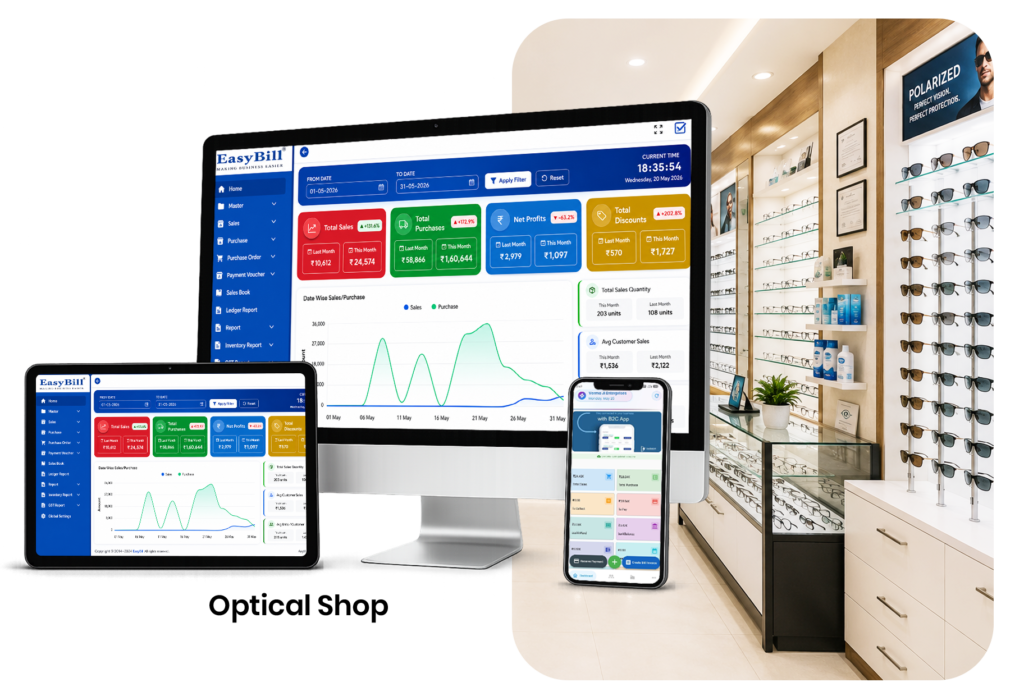
Table of Contents
- What Makes Optical Shop Software the Best Choice?
- 7 Powerful Features to Look For
- How It Can Improve Daily Operations
- How to Choose the Right Solution
- How EasyBill ERP Can Help
- Book a Free Demo
- Frequently Asked Questions
What Makes the Best Optical Shop Software?
When comparing the Best Optical Shop Software, focus on the tasks your team handles every day. Fast billing, organized inventory, customer records and clear reporting are usually more valuable than a long list of features nobody uses.
The best solution is not necessarily the one with the longest feature list. It is the software that fits your staff, products and daily workflow without making routine work complicated.
For an optical shop, that usually means quick billing, accurate stock records, customer management, prescription handling and useful reports. Ease of use matters just as much as the number of features.
7 Powerful Features to Look For in the Best Optical Shop Software
1. Fast and Simple Optical Billing
Billing should be straightforward. Staff should be able to select products, apply the required pricing and taxes, record payment and generate an invoice without unnecessary steps.
2. Frame and Lens Inventory Management
Optical stores often carry many frame styles, lens options and related products. Centralized inventory can help staff see what is available and identify products that need replenishment.
3. Customer and Prescription Records
Repeat customers should not have to explain their details from scratch every time. A suitable system can organize customer information and prescription records so staff can access the information available to them more efficiently.
4. Order and Delivery Tracking
Some optical orders take time because lenses may need to be prepared, fitted or collected later. Order tracking helps staff keep important details visible throughout the process.
5. Barcode and Product Search
Fast product lookup can make a busy counter much easier to manage. Barcode scanning and searchable product records can reduce manual entry and help staff find items quickly.
6. Sales, Purchase and Inventory Reports
Reports help owners understand what is happening in the business. Depending on the software, you may be able to review sales activity, purchases, stock movement and other useful metrics.
7. Secure and Reliable Data Management
Business records need protection. Look for user permissions, backup options and clear data-management procedures. If the software stores sensitive customer information, ask how access and backups are handled.
How the Right Software Can Improve Daily Optical Operations
Consider a customer who visits an optical shop for a new pair of glasses. Staff can record the customer, select a frame, add lens details, capture the order information and prepare the invoice within a connected workflow.
Instead of maintaining separate notebooks for customers, products and orders, the store can keep related information together. This can reduce repetitive work and make follow-ups easier.
How to Choose the Right Optical Shop Software
Start with your daily problems rather than a feature checklist. Write down what takes the most time today. Is it billing? Stock searching? Prescription records? Order follow-up? Reporting?
Then ask software providers to demonstrate those exact tasks. A live test is often more useful than a sales presentation because it shows whether the workflow feels natural for your staff.
- Test a complete optical sale.
- Check frame and lens inventory.
- Create a customer record.
- Review prescription information.
- Create and track an order.
- Generate a sales report.
- Ask about backups and user permissions.
Why Ease of Use Matters
Complex software can create its own problems. If staff need too many steps to complete a normal sale, adoption can become difficult.
A clean interface with practical workflows can help new employees learn faster and keep counter operations consistent. The goal should be to make technology support the store, not make staff work around the technology.
How EasyBill ERP Can Help
EasyBill ERP Optical Shop Management Software provides tools for optical billing, inventory and store management. Explore the available features and compare them with the requirements of your business.
You can also read our billing software guide and accounting software guide for related business management information.
For official information about India’s GST system, visit the official GST portal.
Book a Free Demo
Want to see how an optical billing and management workflow could fit your store? Book a quick demo, explore the features and discuss the requirements that matter most to your team.
Frequently Asked Questions
What is the best optical shop software?
The best option is the one that matches your store’s workflow, including billing, inventory, customer records, prescription handling, order tracking, reporting, security and support.
Can optical software manage frame and lens inventory?
Many optical-focused systems provide inventory management for frames, lenses and related products. Always confirm the exact fields and workflows before choosing a solution.
Can I store customer prescription information?
A suitable optical management system may provide customer and prescription record features. Review the provider’s security, access-control and data-management practices before using it for business records.
Does optical shop software support GST billing?
Many billing platforms support GST-related invoice fields and calculations. Businesses should configure their tax settings correctly and verify current requirements through official guidance or professional advice.
How should I compare optical software?
Compare billing speed, inventory controls, prescription records, order tracking, reports, security, backups, ease of use, support and the software’s ability to grow with your business.
Final Takeaway
Finding the Best Optical Shop Software is about choosing a practical system that makes everyday work easier. Fast billing, organized inventory, customer records and useful reports can help an optical store operate with greater consistency.
Before making a decision, test the software with real store scenarios and involve the people who will use it every day. A short demo can quickly show whether the workflow is genuinely right for your business.